Samsung Galaxy Tab – KIES PC Sync

I’m playing with an evaluation unit of the Samsung Galaxy Tablet from T-Mobile, so I thought I’d post my observations & any useful info I dig up. 

Pricing on this gadget varies widely.  T-Mobile has it for about $250.  If you want to pay more, you can get it from AT&T for $520.  Does that markup seem a little excessive to you?  Good, it did seem that way to me.

The model I have is SGH-T849 (no, not on the box or paperwork anywhere, you have to dig into the phone settings.  Here’s an interesting bit of trivia: If you plug this unit into your computer with the non-standard USB cable (looks like an iPod cable, but isn’t), the computer sees it, but it doesn’t charge it!  You have to plug that cable into the little wall-wart (which is admittedly very slick).

I asked “Irene” (complete with thick Indian accent) how to transfer memos from the tablet to my PC.  I was told this was not possible.  I took another tact and told her that the memo program has the ability to email memos, so I did that.  I ended up with a “.vnt” file as an attachment.  This is not text, html, xml, or anything else useful – it’s some proprietary file format.  I asked what reader I might employ to view said file.  After being put on hold for an extended period of time, “Irene” suggested that I download “Universal Viewer Portable 5.4.4” from the net (just google it, she said).  Cnet has it, if you are interested: http://download.cnet.com/Universal-Viewer-Portable/3000-2248_4-75157196.html?tag=api

According to net.wisdom, the sync program you need to use to transfer files and media to and from the tablet and your PC is called “Kies” (apparently pronounced “keys”, according to tech support).  Try finding this on Samsung’s twisty dead-link littered website, and you’ll be pulling your hair out.  I have less hair now, but victory was mine and I was able to find a link which did allow me to download Kies PC Sync software.  Here it is: http://www.samsung.com/ae/consumer/mobile-phones/mobile-phones/infotainment/GT-I9000HKDXSG/index.idx?pagetype=prd_detail&tab=support

It doesn’t matter what model of phone the website thinks you have, as they only have one sync program for all of them.  When I connect the tablet, I get “This device is not supported by Kies 2.0”.  Not very useful.  However, Windows 7 does see the device as a mass storage device, and can browse it.  I can manually copy pictures/videos back and forth, but I was looking for something more elegant.  Browsing the various folders didn’t yield anything “memo”-looking.

In the root directory is an executable named “Multimedia Sync by doubleTwist.exe” – intriguing!  When I ran it, I got a progress bar which stalled 2/3 of the way through with “Unknown error trying to download Multimedia Sync”.  I tried copying the file to my hard disk and running it from there – same result.

If you go to http://www.doubletwist.com/, you get a download page for an app which apparently does over-the-air sync.  Interesting, but overkill for what I’m trying to do at the moment.  T-Mobile does have a link (after more digging) where you can download this app: http://apps.t-mobile.com/doubletwist/ (it’s curious that tech support didn’t mention this).  After a painfully slow download, I was able to install it.  My initial impression is an iTunes type program for android devices.  Not bad, really!

However, it doesn’t have any ability to access memos.  So… the memo application on the tablet appears to be much like a piece of paper.  You can write on it, and look at it, but that’s it – don’t think you can transfer it somewhere else and use it.  To me, that’s fairly worthless.

*UPDATE* I reviewed the Samsung Galaxy SII cellphone.  Samsung has recently released Kies 2.0 and a wireless version also.
 

Google Chrome – data tracking and privacy

Ok, so I'm a speed freak.  I'll admit it.  I like fast cars, fast airplanes, and fast browsers!  So, when I heard about Google's Chrome browser, and how fast it was supposed to be, I had to give it a shot.

It turns out that it IS fast, and for me works on most of the websites I've visited.  Some websites have issues, so I just fire up a different browser (FireFox or Internet Explorer) and life goes on.

One of the more bothersome things about both Chrome and Internet Explorer, is that they have data tracking built in, and send results back to the mothership.  Yes, this is an invasion of your privacy, but they justify it by saying that they just collect statistical data, and use it to give you targeted ads (really, just a more clever version of Spam, but delivered via your web browser).  The idea is that if what they are advertising is something you want, then you won't feel it's Spam, but you'll be pleased to get it.  I'm dubious, but we'll see.  As a friend of mine said recently, if this leads to a downturn in the amount of email Spam we receive (as advertisers look for a more effective medium), then that's a good thing.

Right now, I'm testing IE 9 beta, and it seems to be pretty good for the most part, but I'm still not ready to abandon Chrome.  So, given that it is my browser of choice, and I don't like the privacy issues, how should that be dealt with?  Wikipedia has a great write-up on Chrome, and in it you'll find the following chart which details what data is captured and when:

Chrome sends details about its usage to Google through both optional and non-optional user tracking mechanisms.

Tracking methods
Method Information sent When Optional?
Installation Randomly generated token included in installer. Used to measure success rate of Google Chrome.

On installation

No
RLZ identifier Encoded string, according to Google, contains non-identifying information how Chrome was downloaded and its install week, and is used to measure promotional campaigns. Google provides the source code to decode this string.
  • On Google search query
  • On first launch and first use of address bar
Partial
clientID Unique identifier along with logs of usage metrics and crashes. Unknown Yes
Suggest Text typed into the address bar While typing Yes
Page not found Text typed into the address bar Upon receiving "Server not found" response Yes
Bug tracker Details about crashes and failures Unknown

Yes

Personally, I don't really care about the non-optional data capture, as it only happens once on installation.  I really don't mind if Google knows that I installed their product.  The RLZ identifier doesn't bother me too much either.  The ones at the bottom though, are more Evil in nature.  They capture every website you go to, and everything you search for.  Google claims that this data will only ever be used for statistical purposes, but we all know that if an institution has data, they'll either use it for their own ends, or the government will subpoena the data and use it for THEIR ends.  Either way, not good for regular folk like you and I.

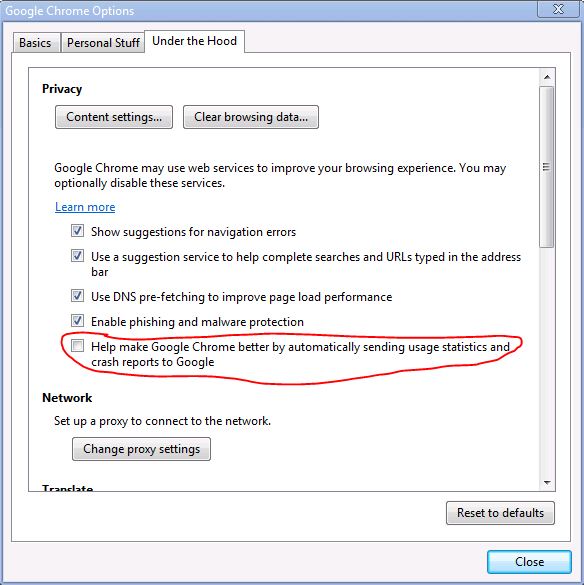
The good part is, you can turn this offHere's how:  Open "Options" from the tool menu (the one with the wrench).  You'll get the google chrome options window.  Click on the "Under the Hood" tab at the top of the window, which gets you into the more geeky settings.  Click on the thumbnail below to zoom in.

Look for the item about sending statistics (circled in red) and un-check it.  Click "done" and you are finished.  Chrome will now not send any of the tracking information back to the mothership.  This includes all items in the chart above with a green "Yes" in the right-hand column.  It's not obvious that this one checkbox does all that (such as address bar & search text tracking), which is IMHO a tad misleading, but this is all you need to do.

iPad/iPhone cleaner pads – take my advice and invest now!

With the advent of the iPad, aPad, and other touch-sensitive tablets, my bet for money-making investment right now is companies who produce microfiber cleaning cloths!  It doesn't take long for the screens of these things to get quite grungy and this seems to be the best thing to clean them.  I have been fiddling with an iPad for about a week now, and I just used my cleaning cloth from my eyeglasses.  It did a great job, but since it's not large, it was a bit fiddly.  So take my advice, and invest in one of these companies.  Oh, yea, and when you are rich, send me a buck or two, okay?

Java – it must be caffeine free

A lot of folks look at Sun’s “Java” engine as a most wonderful, empowering tool. I, however, shudder each time that little red coffee cup appears on my screen. Why do I react that way? It’s because in my experience, Java is problematic. There are tons of versions, none of which really are compatible with each other. Some products built on the platform require version X, and others version Y. Heaven help the poor soul who needs to run both of those products on the same box. A lot of web apps are java based. I go to fire up a web app, see the “coffee cup of death”, and my heart sinks, knowing that I have a 50% chance of achieving my goals, and a 50% chance of being frustrated for an hour or more while I troubleshoot this pathetic excuse for an engine. Some of the time, it just won’t work no matter what I do. I roundly curse the Java geeks, and find another way to achieve my goal.

So c’mon folks, let’s either put some caffeine into Java (Sun? Hello?), or quit using the stupid thing. Please! If more developers turned their back on the platform, it would probably get more attention by Sun. As tons and tons of people persist in using it, Sun has limited incentive to get this right.

Powermat – a cool accessory for your phone

Here’s a cool phone accessory I ran across:  Powermat USA

Powermat with devices charging

There are two classes of devices that can be used with this charger.  Supported devices (iPhone, iPod, BlackBerry, etc) are provided with a replacement back cover which contains the wireless interface.  All other devices have to use a small square interface with a mini-usb connector attached.

How does it work?  There is a pad which is connected to a wall-wart charger which you plug into the wall.  To charge your phone (with the replacement back cover installed), you don’t plug anything in, you just lay the phone on the pad.  This is really nice because in addition to being futuristic and geeky, you shouldn’t have problems with the phone not charging overnight because you didn’t get the plug inserted “just right”.  I’m quite sure I’m not the only one who has had their cell phone die part way through the next day because of this.

So, while I think this is a great product, and just might have to get one, I do have to wonder about the second category of devices.  They give you a square box with a cable sticking out of it, and you put the box on the charging pad, and plug the cable into your phone.

Um… I just can’t see how this is any better than just plugging the original charger cord into the phone.  In fact, I’d call it worse because now there’s another item in the “charging chain”, and any link in that chain which fails causes your device not to charge.  As a result, I don’t think I’d have any use for the charging adapter, and would only want to use this with “supported” devices which have all the cleverness built into the replacement back cover for the phone.