Inane mouseover bad UI design – Google Voice

Here’s another installment in mouseover poorly-thought-out design.  This time, we’ll visit Google Voice (a great service BTW, do yourself a favor and check it out).

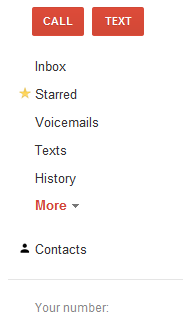
On their page, they have this as a left-hand menu:

image

Ok, looks innocuous enough, but if you want to click on “contacts” and you make the bad mistake of approaching that with your mouse from above, you glide over “More” which instead of a clickable drop-down, it is a mouseover drop-down.  So look what happens:

image

Oh dear, now I can’t click on “contacts”, can I?  Even WORSE… if you move the mouse over there and click on “contacts” quickly, the stupid popup whips out under your mouse and grabs your click!! Now you get “recorded calls” or “Placed calls” and have to dismiss that in order to get what you really wanted.

This is irritating UI design and is poorly thought out.  Users shouldn’t be surprised by getting something they didn’t intend, and they shouldn’t have to creep up on menu options from the right direction in order to use them.  C’mon, Google, get a clue.

Recycle Bin – take your propaganda elsewhere

We used to have a trash can on both the Mac and Windows.  This was a neat idea; a place for discarded items to go before they are really deleted so you can get them back if you have to.

Then, Microsoft decided to “go green” and renamed it to “Recycle Bin”.  Since this was a system object, you couldn’t rename it back to “Trash”.  Fortunately, in windows 7, they have lifted this restriction, so my desktop is no longer polluted by Microsoft propaganda – I have a trash can again.  Of course, all the dialogs related to discard confirmations and such still reference “Recycle Bin”.  They should get the verbiage from the object they are relating to, as if you rename the object, there is now room for confusion as the dialogs and the object do not match.  But I digress…

Why does this irritate me?  Or perhaps you didn’t even ask because the weirdest things irritate me and now you’re used to it.  It’s quite simple: Other than aluminum cans, recycling does not work.  Sorry to burst your bubble, if you happen to think it’s really groovy.  Recycling is a “feel good” waste of time and money which we do because it seems like it ought to be a good thing do do, but we ignore that for the most part it pollutes more than not recycling.

“Save a tree” is pointless.  Paper comes from trees planted in farms by paper producers.  Nobody is carving up the rainforests for this.  If we buy and use less paper, they’ll plant less trees.  It’s simple supply and demand.  Trees are a GOOD thing, we want to encourage people to plant more of them.

Plastic recycling: The recycling process itself introduces more toxic products into our environment than making new plastic does.

Did you ever wonder why nobody will pay you for used paper and so forth, but they will pay you for aluminum cans?  That’s because recycling aluminum actually makes sense and is a good idea.  Most other recycling is government subsidized wasting of time, money, and in many cases is harmful to the environment.

So, the bottom line?  Count me out.  I’m not playing the game.  Companies like Microsoft pushing their sociological agenda via my desktop (or any means, actually) is unwanted and annoying.
Mouse-Overs – good UI idea, but problematic

Having the mouse activate things (like help on what to put in a text field) just by hovering over some spot is pretty neat.  However, with this being used more and more, it’s starting to cross over from neat to annoying.

UI Guideline: If you are going to do a mouse-over help box for a form field, make sure that the pop-up text box containing the help doesn’t pop up over the field in the form!  Seems like an obvious thing, but most of the time the stupid things pop up right over top of where you are typing, and you can’t see what you are typing anymore.  That’s less than useful.  Also, keep the area for the pop-up trigger fairly small.  There are few things more annoying than shoving the mouse out of the way to type, and accidentally ending up over a pop-up trigger which either shows a big old help box right in your way, or even worse, triggers a drop-down for another field which grabs the keyboard and prevents  you typing where you wanted to type.

It’s all about politeness, really.  In short: Don’t get in my way, and don’t make me do things I don’t want to do right now.  You should try to minimize user irritation with user interfaces, and that’s fairly easy to do if you give a little thought to the design.  These days, I’m seeing too many user interfaces peppered with “whizzy features” which are more annoying than not.

Desperate StorageVendors

We’ve been evaluating storage solutions at my company, and with the politics (both internal to our company, and external to the storage vendors), it is starting to feel like a soap opera.  So, I whipped this out:

DespVendors