Ok, so here’s a pretty inane concept for you, and there are companies who do this. To me, this is beyond nutty. I can see outsourcing the grunt processes in your company. I can also see outsourcing various functions such as timecards, service desk, printer maintenance, network maintenance, etc. However, when it comes to Leadership… the leadership of a company IS the company. Outsourcing that is like a ship’s captain turning the rudder over to somebody else then going down to the saloon for drinks, hoping that all will go well.
Hot off the press: Gitane
We finished the last polishing touches on Gitane, a lovely song about a special needs girl. You can give it a listen with the player in the right hand column.
Enjoy!
Tim & Ellis (The Strange Game)
Hot off the press: “Fallen Leaves” from The Strange Game
Just released last night: “Fallen Leaves”, the latest song from “The Strange Game”!
You can listen to it on either of the two music players on the right hand side of this blog, right under “Recent Comments”. Let us know what you think!
I just beat Stevie Nicks!
Wow – on the ReverbNation local Rock chart, I just crept ahead of Stevie Nicks 🙂

Social Network Login Status Detector Demo
Tom Anthony (@TomAnthonySEO) created this interesting demonstration of how a website you visit can easily detect which social networks you are actively logged into. This isn’t a horrible security issue, but it is something that you should be aware of if you care about having some third party “see” which social networks you are using.
In a nutshell, what the technology does is to request that an image be loaded from Facebook, or Google, or whatever. If the load is successful, then you are logged in to that site. If the load fails, then you weren’t logged in and the server has redirected you to the login page instead of serving up the image.
This isn’t really a “fixable” exploit. The obvious way to fix this would be for the servers of all the social network “targets” to always serve up image requests regardless whether you are logged in or not. Clearly, that won’t work as then it would be easy to hack their image stores from an anonymous account. As far as I can see, the only way to “fix” this would be for servers to only redirect to a login page for non-image requests, and just serve up a broken image icon of some type to mask the image when the user isn’t logged in. Of course, the image being served up would have to masquerade as the image requested so the browser would find it difficult to detect. Also, making such changes to servers requires that somebody on that end actually cares about this privacy issue.
I did come up with an interesting “white hat” use for this technology though… If you put it on your company intranet page, assuming employees need to be on there a lot while working, you can detect and log employees that are logged into social networking. If you have (or think you have) content blocks in place for social websites, this can be a tool to find out who is circumventing your blocks.
Operating systems over time
I’ve been involved with computers since 1978, so I’ve seen the evolution of operating systems and user interfaces. It occurred to me today that there are three “phases” that have happened (or are happening). I have some transportation analogies for this:
Unicycle ( unix, dos, cp/m ) – like a unicycle, these operating systems could pivot on a dime, they were small, and cool. They weren’t very easy to use though, and took considerable skill on the part of the rider (operator).
Car ( Windows XP, Mac ) – like a car, these operating systems were much easier to use than the Unicycle. They were fast and useful. While they couldn’t quite pivot like a Unicycle, they were still very flexible.
Train ( Windows 8 ) – Even easier to use than the car, but it only goes forward and backward on the track. The attempt to dumb down the user interface so it can be supported on all devices and screen sizes necessarily limits flexibility.
New Music Widgets
Check out the new music widgets in the right hand column! You can instantly play some of my music via Reverbnation. If you click on the song links below, you’ll be taken to our website and can read the lyrics while you listen.
The top one is “The Strange Game” which is my current music project with my good friend Ellis. As you may know, we’re working on putting together a CD, but we’re making some songs available in “pre-release” form for your enjoyment. “In The Bedroom” is hot off the press, and that’s also available for purchase on iTunes as a single. “You Can Run” we just finished last night (after many “final” versions – LOL). No really, we’re done now.
The bottom one “Tim’s Music” is some of my older stuff with a bonus instrumental version of “You Can Run”.
Let me know what you think!
Samsung Galaxy SII – Review
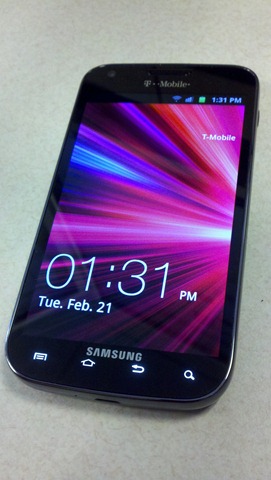 The kind folks at T-Mobile gave me one of the new Samsung Galaxy SII cell phones (retail $599.99, or $229.99 with 2 year contract discounts) to evaluate, so I thought I’d share my findings here.
First blush: Inside the nifty, colorful box is the cell phone, a battery, a SIM card, a manual and various warranty/repair paperwork, and one of the new super-small AC Wall chargers (aka:wall-wart).
There is a big warning that tells you that you MUST use the SIM card provided. If you have a SIM card from an older phone, you can’t just pop it in this phone and expect it to work. That was a bit surprising.
The battery cover is a bit weird. If you lay the phone on it’s face, there is a small indent in the upper right corner. You put a fingernail or something fairly thin and sturdy in there and pry the cover off carefully. There are small plastic tabs all around the perimeter. I didn’t break any, but I can see that if you were not careful, it would probably be possible to damage it. I put the battery and the SIM in, and put it on charge.
The phone is really slim. Compared to a Droid-X, it’s the same thickness but the bulge at one end is much smaller than the Droid-X bulge, so it “seems” incredibly slim (0.37” – 9.4mm):

It’s height is 5.11” (129.8mm), width is 2.71” (68.8mm) and weight is a scant 4.77oz (135 grams). I had a couple of people ask if the battery was installed when I handed them the device, it’s that light. Continuing with the Droid-X comparison, it is a little wider (by 0.13”), and a little taller (by 0.09”).
The AC charger adapter is one of the new iPhone style jobbies – very small and cute, and won’t burn two AC sockets like the big traditional wall-warts. It’s hard to tell from the picture but it is about 1.12” square (2.7cm):

This is a 4G phone, and so if you are lucky enough to have a 4G cell near you, it’s really fast. If not, then you get acceptable 3G performance as a fallback. They quote up to 42Mbps download speed with 4G coverage. I wasn’t able to test that definitively, but it did seem plenty fast.

Inside is a Snapdragon S3 processor with a 1.5Ghz dual-core CPU, running Android 2.3.6 (Gingerbread). Wi-Fi 802.11 a/b/g/n are supported, as is Bluetooth 3.0
On powering it up, the first thing I (and others who have seen it) noticed is the gorgeous screen. This is a 4.52” Super AMOLED Plus screen with 800×480 pixels, and it’s incredibly contrasty and bright. The blacks are VERY black, and I got ooos and aaahs from everyone who fondled it. I evaluated a couple of phones last year with this type of screen, and their battery drain was horrible. This phone doesn’t seem to be quite as bad, though the factory defaults turn off the screen if you haven’t touched it in 15 seconds. I kicked that up to a minute. It’s really annoying when you are reading something on the display and it goes black on you. Still, if you charge it nightly and don’t waste your entire day playing “Angry Birds”, the battery seems to last.
The 8MP camera is quite nice, but nothing surprising compared to other Androids. This does have a second 2MB front-facing camera for video chat. There is an HDMI output, but that requires you to purchase a MHL adaptor, so I didn’t do that.
For about 15 bucks extra per month, you can enable hotspot tethering. This works well and supports up to 5 connections. However, when this is turned on, your phone loses it’s data connection. This means you won’t get emails or social media updates until you turn the hotspot off.
Speaking of Wi-Fi, one of the interesting features this phone has is Wi-Fi Calling. This can be very handy – let me give you an example. Let’s say you work in a large office building. In the middle of those buildings, there is typically very little (if any) cell coverage. If you set the phone up to attach to the company Wi-Fi, then when you walk in the door and are in range, the phone will activate Wi-Fi calling (you can turn it off if you want – no worries). Once it does this, any incoming our outgoing call will go over the Wi-Fi connection, and the internet connection behind it of course as a VOIP call. This seems to work really well. Last year, the units I tested were flaky at best. The only gotcha is if you are on a Wi-Fi call, and you walk outside and out of range, the call will drop. There is no mechanism to hand the call off to a cell tower.
For those of you who like to watch movies on your phone, Netflix, T-Mobile TV, and Samsung Media Hub are preloaded. While it works, and I guess a lot of people like doing this, I find it uncomfortable to be hunched over a cell phone for any period of time.
Double-tapping the top of the unit (there is no key there, you just bonk it) brings up the Samsung Voice Solution. This is pretty cool and lets you control a lot of things with voice commands. It seems to be pretty accurate, and so might be more usable than previous incarnations. Voice control is always iffy. My Toyota Prius theoretically has it. However, I’ve found that no matter what I say, or how I say it, it says “turning screen off”. Lovely. Also, one time I tried to get it to display gas station icons on the nav unit. I got Golf courses. I even tried speaking with a Japanese accent. No good – it’s just not usable. The Samsung implementation is much better.
Like most android implementations, Swype is supported. If you haven’t used Swype before, you owe it to yourself to give it a shot. This is a REALLY great input system. In theory, you can “type” in a note up to 40wpm using Swype. I’m not nearly that fast, but it’s a lot faster than poking individual letters, and usually a LOT more accurate. The idea is that you don’t take your finger off the screen. You just cruise from letter to letter to make up your word (and you don’t have to be all THAT accurate in your motions either). It’s pretty wild, and very cool.
If you are in a meeting and don’t want to be embarrassed by your goofy ringtone, just turn the phone face-down on the table and it will automatically be muted.
One of the more unusual motion “gestures” I’ve seen is the “tilt zoom”. Once this is enabled, if you are viewing something (a web page or a picture) that supports pinch-zoom (touch the screen with 2 fingers and pinch them together), then you can use this new gesture. Touch the screen with 2 fingers (thumbs are convenient), then tilt the device back and forth. It will zoom in and out. It’s hard to control where on the screen it’s using as the center of the zoom, so I don’t know if this is really all that usable in the real world, but it will make your iPhone buddies envious just because it LOOKS cool.
This phone also has some features of particular interest to the Enterprise Corporate folks:
- Microsoft Exchange ActiveSync is built in, allowing real-time communications and sync with your email.
- Hardware based encryption: Sybase Afaria Mobile Device management can use this to encrypt all your data. I’d expect other MDM solutions to begin to support this soon.
- VPN – Virtual Private Network: Cisco’s AnyConnect is included.
- Cisco Webex is supported
To sync with your computer, Samsung has released the new Kies 2.0 (the old version was 1.5). You can also use Kies Air to wirelessly sync your data. This allows you to sync between your phone and computer wirelessly but only when they are both connected to the same wireless access point.
8 minutes of fame – Parenting on facebook, and shooting a laptop
Well, 8:23 to be exact. That’s the length of the video that Tommy Jordan posted on Facebook in rebuttal to a rant his teenage daughter posted. His intent was that the same audience who saw her rebellious rant should receive his video. In the video, he addresses her rant and as then as punishment for her publishing this rant, he followed through on his warning of what would happen if she did this again – he put a few bullets in her laptop. Personally, I think it’s very important for a parent to follow through on what they say they will do, and be predictable. So Kudos to Tommy for doing that 🙂
But then, the unexpected happened – the video went viral, and now has over 27 million views! This wasn’t something he predicted or even wanted, but as he says on his website “it is what it is”. If he’d just backed his truck over the laptop… a few times… it may not have taken off, but the fact that he used a gun to destroy it seems to really have rocketed this to the forefront of American consciousness.
In order to get this traffic off his Facebook page, and to have more control of it, he’s made a website for it: http://8minutesoffame.com/

It’s quite amusing the different responses to this albeit unusual method of meting out punishment. Apparently, words were tried and failed, and other methods were tried and failed also. This apparently got her attention (a tough thing when dealing with teenagers).
Something like 73% of people in a today.com poll (121,000 people responded) agreed with Tommy’s method of punishment. Of course, there are lots of vocal folks who took issue with it, claiming that his daughter would be scarred for life, and oh how horrible, etc etc. C’mon people get a clue. Kids really aren’t that fragile. Really. If a parent takes away something and destroys it or sells it or just locks it up so the kid can’t have access to it, then perhaps the kid will learn something. Or not, but at the very minimum the kid sees that there is a consequence to their actions. If that consequence is not significant enough to prevent the kid doing something similar in the future, that’s fine, but at least the kid knows that there are consequences for things we do in life, and that will weigh into the decision on whether or not to do “behavior X” or not.
“My documents” folder renaming on a network share
This is a very annoying Windows 2008 R2 bug which was reported way back in 2010 but still there is no fix from Microsoft. Here’s an example from the educational sector.
Here’s the symptom: You have a bunch of users and want to keep their “my documents” folders on a network share so that it can be easily backed up, and so if their computer dies, it’s no big deal.
You create the share, we’ll call it “UserData” and share it out to all the workstations. Then, you go to each windows 7 workstation in turn and start redirecting each user’s “my documents” to a folder with their name in that share. So “Stan” would get a “Stan” folder inside “UserData”. Nice and tidy. All of your users now have their own personal sub-directory and it’s easy to see who owns what data. It’s also easy to back up and restore.
At some time later on (not sure what the trigger is, but it seems it has to do with when the user logs off), this folder is mysteriously renamed to “my documents”. Now, you have a ton of folders in “UserData” which apparently have the same name (“My Documents”), and you don’t know who owns what data!!! The links from the Windows 7 PCs seem to stay intact, but it’s impossible to manage at the server level.
Sure, one solution is to have “UserData/Stan” and put a “my documents” folder in there. But why should I do that? When you do the “my documents” redirect, it allows you to pick a folder as the redirect target. If the folder name you’ve picked is not acceptable, you shouldn’t be able to pick it. But there is no such error or warning. Everything seems fine until some random time when the system decides to “fix” it for you.
This is what I refer to as “arrogant code”. Somebody at Microsoft made a conscious decision that they know better than you do, and regardless what you wanted to rename that folder, they will impose their iron will and rename it the way THEY want it. This isn’t a bug where somebody made a typo in the code. This is a very poor consciously made behavioral decision. One might wonder… why? Why is some engineer at Microsoft overriding the customer’s decision?
 Inane World