How to change the default image editor in windows 8

I sometimes need to edit image files, and usually I use GIMP (a really wonderful free editor).  However, as I don’t do this very often, I invariably right-click on the image and pick “edit”, forgetting that all that will do is launch the crusty old Microsoft Paint program Sad smile  So, I did some web-digging this afternoon and came across a very simple article detailing the procedure.  Here’s a link to the original, and below is an excerpt for those of you who don’t need the video demonstration and so forth:

You need to go to the registry editor to make the changes. It is always a good idea to make a backup of your registry before continuing. Modifying the registry can be tricky if you don’t know what you are doing, and you can do major damage to your system if you aren’t careful

  1. Press the start menu key and type “regedit” and locate the key:HKEY_CLASSES_ROOT\SystemFileAssociations\image\shell\edit\command
  2. Locate the string value in the right windows called (default). The value will be“%systemroot%\system32\mspaint.exe” “%1″
  3. Change the value to point to the program you want to use instead. E.g. C:\Program Files\GIMP 2\bin\gimp-2.8.exe" “%1″ (This will set GIMP as default editor)

Don’t delete the “%1″ part at the end of the string. This is a variable that holds the name of the picture you are clicking on. You might also find that your path to the program might be different from mine.

If you want to set some other program as the default edit (or if your path is different), find it in C:\Program Files and when you have the correct “.exe” file in your sights, SHIFT-right-click and pick “Copy as path”.  That will put the full path and file name onto the clipboard so you can just paste it into RegEdit (above).

It’s cold here! (sort of)

Californians crack me up. After living in Canada and New Jersey, I got used to snow and cold.  So when I see people wandering around newport beach in Parkas with mittens, I can’t help smiling.  Jimmy Kimmel assembled this bit which is painfully true:

Jimmy Kimmel on LA cold

Stainless is DEAD–whoooohooooo!

I ran across this article today, which talks about Whirlpool’s introduction of a new finish for kitchen appliances:

whirlpool-whiteice.jpg

This is great news, as far as I’m concerned.  Personally, I’ve been bored with stainless finishes since a couple of months after their introduction.  I just have never liked them, and I don’t understand the fascination with them in the market.  I believe that a lot of this has been driven by “Makeover” shows.  Those people crack me up.  They’ll walk into a house that has a kitchen which looks about the same as my current kitchen.  They’ll stylishly wrinkle their collective noses and say “well, this is clearly unusable – a ‘gut job’ for sure”.  Unusable eh?  Seems to work fine for me, but then I’m more about function than form.  Then, of course, they re-do the kitchen in a questionable color scheme, but almost always with granite counter tops and innovative cutting-edge stainless steel appliances – like nobody has done THAT before.

Inane gas pump signage; drive-off with hose attached

Here’s a good one I ran across yesterday:  The local Shell station near work has a nice sign glued to their pumps advising motorists not to drive off with the pump hose still attached to the gas tank.  To underscore how serious they are about this, they wrote “violators will be liable to pay the cause of damages”.   Yea, I had to read it twice too.  Wow!  Somebody wrote that, then somebody else approved it, then it went out to the printer… by the time it arrived at the station for the owner to affix to the pumps, dozens of people had seen it.  Yet nobody said “um, what?”

Lorem Ipsum–goofy MS Word tip for the day

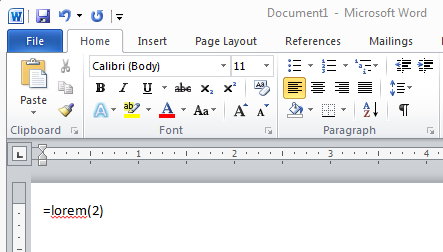
Here’s an odd one for you.  Try typing this in Microsoft Word on a line by itself and hit enter:

image

What you’ll get is this:

image

Pretty bizarre, eh?  This is the famous “lorem ipsum” pseudo-latin text that is used extensively by graphic design folks.  The idea is that if you present a layout that has readable text, whoever you show it to will READ the text and that will influence whether or not they like the layout.  The goal is to represent that “text goes here” but NOT have people waste their time reading and comprehending it.

In my example above, I specified “=lorem(2)” which means “give me 2 paragraphs of gibberish”.  If you want more, just change that number.  Word will give you 3 sentences per paragraph by default, but if you want more, you can have it!  Try =lorem(2,10) – that’ll give you two paragraphs with 10 sentences each.

Long Prius

This looks photoshopped, but it is not.  This is apparently a Prius which has been “customized”.  This stretch prius was parked in a mall parking lot in north Orange County 7/15/2012.  Thanks to my friend Randy for thinking I’d be interested and snapping this picture on his cell phone.


Long Prius